Content-Driven Native Ads with Google Ad Manager – Part 2

In the previous post, I discussed how to find/display content-relevant native ads by targeting to particular keywords and categories using Googletag. In this post, I’ll show you how to get the keywords and categories of a page automatically in real time when a page is viewed, and then, display relevant native ads using Googletag.

The following code is taken from Ads relevant to content with Adrelevantis bidder adapter.

//Content-Driven Advertising needs access to content. So, wait DOMContentLoaded event to start the bid process
document.addEventListener("DOMContentLoaded", function(event){   
  //Content-Driven Advertising refers to individual pages
  //Set referrer to no-referrer-when-downgrade to ensure safety while providing page path
  if (document.querySelector('meta[name="referrer"]') === null){
    var meta = document.createElement('meta');
    meta.name = "referrer";
    meta.content = "no-referrer-when-downgrade";
    document.getElementsByTagName('head')[0].appendChild(meta);
  }
  else {
    document.querySelector('meta[name="referrer"]').content = "no-referrer-when-downgrade";
  }
  
  var q = document.getElementsByTagName('body')[0].innerText;
  
  var pload = 'q=' + encodeURIComponent(q);
  var h = new XMLHttpRequest();
  h.onreadystatechange = function () {
    if (4 === this.readyState) {
      if (200 === this.status) {
        var res = JSON.parse(this.responseText);
        if (res != null){
          var cats = res["Category"];
          var keywrds = res["Keyword"].replaceAll(/\|/g,",");
          bidFunc(keywrds, cats)
        }
      }
    }
  };
  h.open("POST", "https://api.adrelevantis.com/getcatskeywords", true);
  h.setRequestHeader("Content-type", "application/x-www-form-urlencoded");
  h.send(pload)
});

When DOMContentLoaded is fired, the page content is sent to a web service called “https://api.adrelevantis.com/getcatskeywords“. The web service returns ranked keywords and IAB Categories of the content. The keywords and the categories are passed into bidFunc to start bid.

In summary, here is what happens when a page is viewed. A user opens the page -> At DOMContentLoaded event, the page content is parsed for its keywords and IAB categories -> The keywords and the Categories are sent to the bidder -> The bidder returns a bid that matches the keywords and the categories along with other bid parameters -> The bid is sent to Google Ad Manager for display.

Here are a few live examples. Click them to see native ads that are relevant to their content.

Pets: how-you-can-maintain-your-pets-dental-health

Cooking: essential-french-onion-soup

Entertainment: laura-marano-new-single-let-me-cry

Home and Garden: the-impracticality-of-hardwood-flooring

Sports: big-ten-reporters-pick-michigan-to-win-league-title-in-2019

Contact: info@adrelevantis.com.

To understand what the Content-Driven Advertising is, please read the following post:
Content-Relevant Native Product Ads Make Different

Content-Driven Native Ads with Google Ad Manager – Part 1

Google Ad Manager has been set up to work with Adrelevantis Bidder Adapter to deliver native ads that are relevant to page content. As a publisher, you just need to use the Google tag to display relevant ads in your pages. In this blog, I will show you how to make a page to display content-relevant ads by providing keywords and IAB Categories for the page.

Here, I assume that you have basic understanding of Prebid.js header bidding open source library. If you are new to the Prebid.js, please read this Basic Prebid.js Example. Then, go to Ads relevant to content with Adrelevantis bidder adapter to see the code that is discussed in this blog.

Here is the entire code from native-example.html.

<html>
<head>
<script async src="//www.googletagservices.com/tag/js/gpt.js"></script>
<script async src="//www.adrelevantis.com/pub/prebid.js"></script>
<script>
//Prebid.js and Google Ad Manager code
var googletag = googletag || {};
googletag.cmd = googletag.cmd || [];

var PREBID_TIMEOUT = 3000;
var FAILSAFE_TIMEOUT = 6000;

var pbjs = pbjs || {};
pbjs.que = pbjs.que || [];

function bidFunc(keywrds, cats)
{
  //Keywords and IAB Categories of the content are sent as bidder parameters
  pbjs.que.push(function() {
    pbjs.setBidderConfig({
      bidders: ['adrelevantis'],
      config: {
        ortb2: {
          site: {
            keywords: keywrds,
            ext: {
              data: {category: cats}
            }
          }
        }
      }
    });

    var adUnits = [
    {
      code: 'div-1',
      mediaTypes: {
        native: {
          sendTargetingKeys: false,
          title: {
          required: true
          },
          image: {
            required: true
          },
          clickUrl: {
            required: true
          },
          sponsoredBy: {
            required: true
          }
        }
      },
      bids: [{
        bidder: 'adrelevantis',
        params: {
          placementId: 13232354,
          allowSmallerSizes: true,
          cpm: 0.9
        }
      }]
    },
    {
      code: 'div-2',
      mediaTypes: {
        native: {
          sendTargetingKeys: false,
          title: {
            required: true
          },
          image: {
            required: true
          },
          clickUrl: {
            required: true
          },
          sponsoredBy: {
            required: true
          }
        }
      },
      bids: [{
        bidder: 'adrelevantis',
        params: {
          placementId: 13232354,
          allowSmallerSizes: true,
          cpm: 0.9
        }
      }]
    },
    {
      code: 'div-3',
      mediaTypes: {
        native: {
          sendTargetingKeys: false,
          title: {
            required: true
          },
          image: {
            required: true
          },
          clickUrl: {
            required: true
          },
          sponsoredBy: {
            required: true
          }
        }
      },
      bids: [{
        bidder: 'adrelevantis',
        params: {
          placementId: 13232354,
          allowSmallerSizes: true,
          cpm: 0.9
        }
      }]
    },
    {
      code: 'div-4',
      mediaTypes: {
        native: {
          sendTargetingKeys: false,
          title: {
            required: true
          },
          image: {
            required: true
          },
          clickUrl: {
            required: true
          },
          sponsoredBy: {
            required: true
          }
        }
      },
      bids: [{
        bidder: 'adrelevantis',
        params: {
          placementId: 13232354,
          allowSmallerSizes: true,
          cpm: 0.9
        }
      }]
    }];
    
    googletag.cmd.push(function() {
      var slot1 = googletag.defineSlot('/21901351985/native_nature', 'fluid', 'div-1').addService(googletag.pubads());
      var slot1 = googletag.defineSlot('/21901351985/native_square', 'fluid', 'div-2').addService(googletag.pubads());
      var slot1 = googletag.defineSlot('/21901351985/native_horizontal', 'fluid', 'div-3').addService(googletag.pubads());
      var slot1 = googletag.defineSlot('/21901351985/native_vertical', 'fluid', 'div-4').addService(googletag.pubads());
      googletag.pubads().disableInitialLoad();
      googletag.pubads().enableSingleRequest();
      googletag.enableServices();
    });

    pbjs.addAdUnits(adUnits);
    pbjs.requestBids({
      bidsBackHandler: initAdserver,
      timeout: PREBID_TIMEOUT
    });
  });

  function initAdserver(bids) {
    if (pbjs.initAdserverSet) return;
    
    googletag.cmd.push(function() {
      pbjs.que.push(function() {
        pbjs.setTargetingForGPTAsync();
        googletag.pubads().refresh();
      });
    });
    
    pbjs.initAdserverSet = true;
  }
  
  setTimeout(function(bids) {
    initAdserver(bids);
  }, FAILSAFE_TIMEOUT);
};

bidFunc("Pets Dental Health,Pet dental", "/pets|/pets/cats");
</script>
</head>
  <body>
    <h2>Native Content-Driven Advertising Examples</h2>
    <div id='div-1'>
    </div>
    <div id='div-2' style="width: 30%">
    </div>
    <div id='div-3' style="width: 50%">
    </div>
    <div id='div-4' style="width: 25%">
    </div>
  </body>
</html>

The function bidFunc(keywrds, cats) has typical Prebid.js code for publishers that works with Googletag. Pay attention to the setBidderConfig that sets keywords and categories for adrelevantis bidder. These keywords and categories are used to match ads. If an ad found and other criteria (geo-location, cpm, etc.) met, a bid is returned. The rest of the code defines ad units, maps the ad units to ad slots of Google Ad Manager, and requests bid.

In this simple example, we hard-coded the comma-separated keywords (“Pets Dental Health,Pet dental”) and the pipe-separated IAB Categories (“/pets|/pets/cats”) for demonstration purpose. If you know the keywords or IAB Categories of a page, or you want to target to particular keywords or categories, you can use this approach. However, it will be more useful if the keywords and categories of a page can be identified automatically when the page is viewed. In next post, I will discuss how an AI service can be used to identify the keywords and categories of a page automatically.

Click the following link to see native ads in this example: native-example.

Contact: info@adrelevantis.com.

To understand what the Content-Driven Advertising is, please read the following post:

Content-Relevant Native Product Ads Make Different

Programming Adrelevantis Bidder Adapter With Native Ads

First, please go to open source repository https://github.com/ghguo/adrhbexamples to get the code and get some feeling about the examples.

The key functionality is in function adrtags(adUnits, adDivIds), which is in the Javascript contentdriventag.js (you can get the file at https://www.adrelevantis.com/pub/contentdriventag.js). The function adrtags takes two parameters: adUnits as defined Prebid.js ad units, and adDivIds as defined DIVs in the page that correspond to individual ad units.

The function adrtags does three things.

1. It extracts page content and sends it to a content analysis (AI) service and returns its IAB Categories and ranked keywords.

2. The IAB Categories and the keywords are added to the Adrelevantis bidder as First Party Data of Prebid.js. The bid request is sent to the Adrelevantis SSP and other SSPs.

3. The returned bids are rendered as native ads. It gives one way to render the bids as native ads. You can use Google Ad Manager for native ads if you work with Google Ad Manager. Or you can render the bids in native ad formats using your own code.

Please don’t hesitate to ask if you have any questions. You can leave a comment or drop us a line at info@adrelevantis.com.

When Header Bidding Should Start In A Page View

Header bidding is a technique developed to improve the performance of RTB. Header bidding takes the RTB process one step further by allowing an ad impression to be put up for auction across multiple demand sources at the same time, instead of running the auction through each demand source one at a time (a process referred to as “waterfalling”).

The above definition states putting an ad impression up for auction across multiple demand sources at the same time, but does not say when to do it in a page view. Actually, it can start anytime in a page view. The general guideline is that it should provide as much information to the demand sources as possible while minimizes interfering with user experience.

Often times, the header bidding process starts as soon as the page loads within the user’s browser. This way, the header bidding process competes with page content loading, which may result in longer waiting time for a user to see page content. The other issue is that the page content is not available yet for demand sources, which is critical to the Content-Driven Advertising.

Another option is start the bidding process in a DOMContentLoaded event handler. There are a few advantages by doing this. First, it doesn’t compete with page content loading. Second, by waiting for DOMContentLoaded and then starting the bidding process, the page content is available to the demand sources to make better decisions.

The blog Programming Adrelevantis Bidder Adapter gives an example for starting bidding process in a DOMContentLoaded event handler.

Please contact us for more information at info@adrelevantis.com.

Programming Adrelevantis Bidder Adapter

Programming Adrelevantis Bidder Adapter is the same as other Prebid.js Bidder Adapters. The only difference is when the bidding process should start. Normally, header bidding begins as soon as the page loads within the user’s browser. For Adrelevantis Bidder Adapter, the bidding starts in the event handler of DOMContentLoaded event. The reason is that Adrelevantis Bidder Adapter needs to access to the page content to match ads based on the content.

document.addEventListener("DOMContentLoaded", function(event){ adrtags(adUnits, adDivIds); });

The above code is excerpted from programming examples at Ads relevant to content with Adrelevantis bidder adapter in GitHub.

There are a few implications. By putting adrtags function in DOMContentLoaded event handler, it can extract and parse the page content, then, search ads based on the content, and display ads. By starting bid until the document has been loaded, it also alleviates the concerns that the bidding process competes with page content loading. The user gets more responsive page loading experience.

Please go to GitHub open source for complete examples at https://github.com/ghguo/adrhbexamples.

Please contact us for more information at info@adrelevantis.com.

Can Publishers and Advertisers Both Win?

In programmatic advertising, publishers and advertisers have had a love-and-hate relationship. Publishers like advertising money but are concerned by a downgraded user experience for their audience by displaying ads. Advertisers want to present ads to audiences, but are concerned about how effectively their advertising money is spent. The issue was such a concern that Bloomberg News announced it would pull the plug on open exchanges.

So, how do we address these concerns? The answer is Content-Driven Advertising. For too long, ad exchanges have served ads to audiences without knowledge of the content on the page, and the publishers can not control for content-relevant ads. With Content-Driven Advertising, ads that are relevant to page content are delivered and enhanced user experience is achieved. As a result, advertisers, publishers, and audiences all win.

At AdRelevantis, we have developed Content-Driven Advertising technology that displays ads based on page content. It has been integrated with open exchange Prebid with AdRelevantis Bidder Adapter. Using this, content-relevant ads are displayed dynamically in real time when a user is consuming the page content.

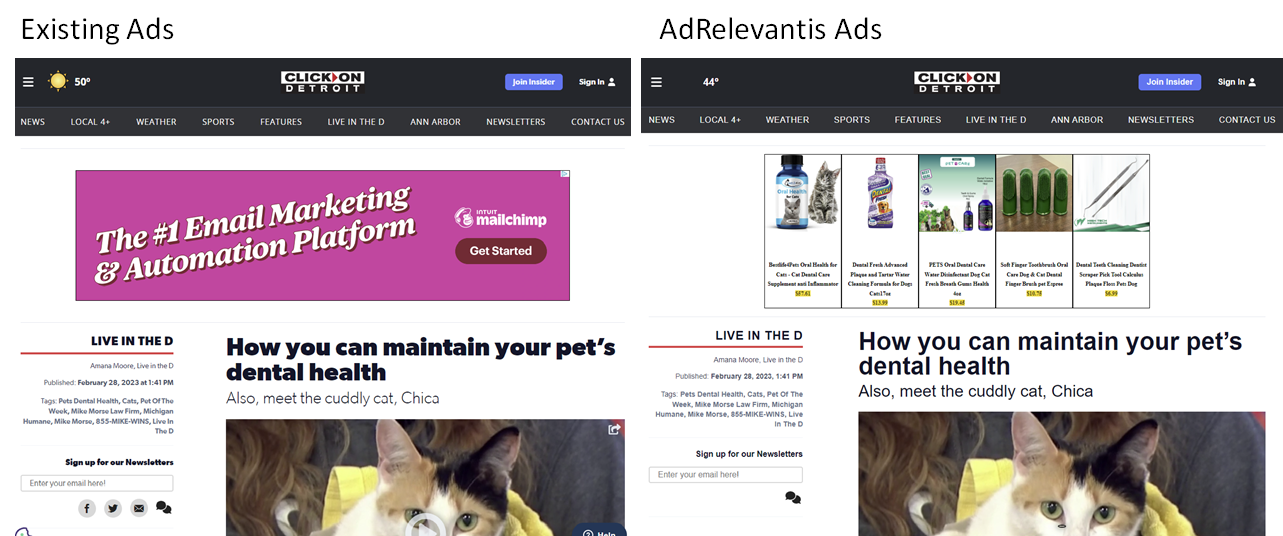
Here is an example that shows how Content-Driven Advertising is different.

Please drop us a line at info@adrelevantis.com or go to https://www.adrelevantis.com to find more information.

Programmatic Advertising, User Experience and Content-Relevant Ads

Bloomberg Media Is Shutting Off Its Open-Market Programmatic Advertising. The decision aims to improve the user experience. The decision to eliminate open-market third-party programmatic display ads tracks with a larger shift occurring in the media industry, as more publishers recognize the need to design their websites to prioritize readers, rather than over-stuff pages full of ad slots.

“The calculus is changing,” Troy Young, the former global president of Hearst Magazines, said. “Is the yield worth the negative user experience? If programmatic is a small percentage of inventory, yield is going the wrong way and you have a new means of monetization in reader revenue, more publishers are going to reach the same conclusion.”

It is sad that the publisher industry equates the programmatic advertising with negative user experience. It should not be the case. Luckily, there are companies or ad tech startups that try to fix this. Adrelevantis is one of them.

Adrelevantis has developed a technology – Content-Driven Advertising that displays ads relevant to publisher’s page content. It has integrated with programmatic advertising Open Source Prebid.js with Adrelevantis Bidder Adapter. Content-relevant ads mean better user experience while generating revenue. You can go to this blog to see the examples of Content-Driven Advertising.

Feel free to drop us a line at info@adrelevantis.com or contact us at https://www.adrelevantis.com/ if you have any question or would like to know more about Content-Driven Advertising.

Content-Relevant Ads with Prebid.js and Google Ad Manager

For publishers that would like to display content-relevant ads, you can go to Customize and Download Prebid.js and check Adrelevantis bidder adapter (https://docs.prebid.org/dev-docs/bidders/adrelevantis.html). You can also build from source code. Once you have the code, add the code file to your page (replacing www.mydomain.com with real domain path).

<script async src="//www.mydomain.com/prebid.js">

Next, if you have a Google Ad Manager account and would like use it to manage your prebid.js header bidding, you can set it up by following this link (https://docs.prebid.org/adops/step-by-step.html). Then, add the following line to your page.

<script async src="//www.googletagservices.com/tag/js/gpt.js">

Now here comes your secret sauce for displaying content-relevant ads. Just add the following line to your page.

<script src="//www.adrelevantis.com/pub/contentdriventag.js">

The above code parses the page content to identify its IAB Categories and top keywords and sends them to Adrelevantis bidder adapter for matching ads.

This is just a high-level description how Adrelevantis works with Prebid.js and Google Ad Manger to display content-relevant ads. There are still more details. Here is a working example to show how it works. Feel free to explore the source code of the page for the details.

Anaplasmosis in Dogs: The Tick-Borne Disease You Might Not Know About

Drop us a line at info@adrelevantis.com or contact us at https://www.adrelevantis.com/ if you would like to know more.

Content-Relevant Native Product Ads Adapt to Your Pages

Content-Relevant Native Product Ads not only match your page content, but also adapt to your page’s look and feel. They mix with the page content naturally and natively. Here are a few examples.

Content-Relevant Native Product Ads are between text content and image content.

Content-Relevant Native Product ads are between image content and text content.

As you can see in the above screenshots, there are a few different layouts of the Content-Relevant Native Product ads. They are: Square, Cross Board, Horizontal Rectangle and Vertical Rectangle.

It is very easy to design a layout and its size. In the ad unit, you specify sizes as follows.

Square: You specify width and height as follows.

{
  ......,
  sizes: [[250, 250]],
  ......
}

Cross Board: You specify width as 1 and height as 1. The ad will be rendered as height=100px and width=100%.

{
  ......,
  sizes: [[1, 1]],
  ......
}

Horizontal Rectangle: You specify the width and height as follows.

{
  ......,
  sizes: [[320, 250]],
  ......
}

Vertical Rectangle: You specify the width and height as follows.

{
  ......,
  sizes: [[250, 400]],
  ......
}

To see the complete page and code, please go to https://www.adrelevantis.com/hb/gardenmanage-statuses-1000452175.html.

Feel free to drop us a line at info@adrelevantis.com or contact us at https://www.adrelevantis.com/ if you have any question or would like to know more about Content-Driven Advertising.

Content-Relevant Native Product Ads Make Different

Look at the following screen.

This is a side-by-side comparison between Content-Relevant Native Product Ads and other ads. Yes, you are right. The ads on left-hand side are Content-Relevant Native Product Ads. The ads on the right-hand side are the other ads.

The Content-Relevant Native Product Ads are ideal to go within content as shown in the following screen. The right-hand side is the original page while the left-hand side is the page that uses Content-Relevant Native Product Ads.

Here is a live example that shows how the Content-Relevant Native ads are different.

The page with regular ads: How you can maintain your pet’s dental health.

The page with Content-Relevant native ads: How you can maintain your pet’s dental health.

Got the idea? Ready to try it with your content? Please go to the open source GitHub project at https://github.com/ghguo/adrhbexamples to find the code and more examples.

Feel free to drop us a line at info@adrelevantis.com or contact us at https://www.adrelevantis.com/ if you have any question or would like to know more about Content-Driven Advertising.